2230 SSDs for ROG Ally and Handheld Gaming PCs
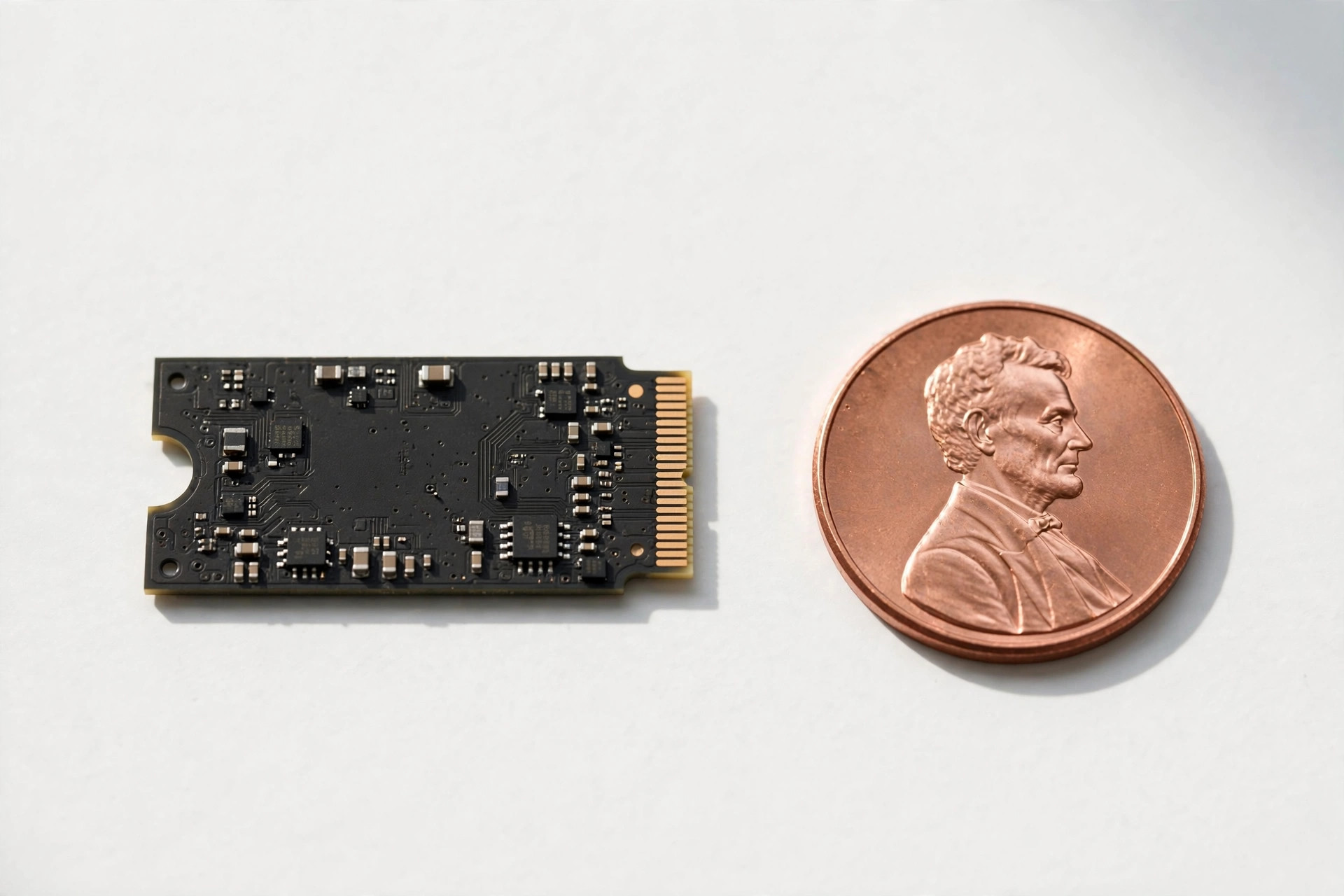
Handheld gaming PCs live and die by their storage. The ROG Ally ships with 512GB, the Legion Go with 512GB or 1TB, and modern PC ports routinely demand 100GB+ each — Call of Duty alone can swallow a sixth of the drive. Unlike the Steam Deck, the handheld market is split between two physical SSD sizes, and buying the wrong one is an expensive mistake. This guide maps the whole 2230/2280 landscape: which handheld takes what, which drives to buy in 2026, and how to migrate your library without redownloading everything.
Know your handheld: 2230 vs 2280
The single most important fact of this guide:
| Handheld | M.2 size | PCIe generation | Notes |
|---|---|---|---|
| ROG Ally (2023) | 2230 | Gen4 x4 | Tight thermal envelope; single-sided only |
| ROG Ally X | 2280 | Gen4 x4 | Full-size slot — entire desktop SSD market available |
| Lenovo Legion Go | 2242 (stock) / 2280* | Gen4 x4 | 2280 fits with an adapter bracket; verify your revision |
| MSI Claw | 2230 | Gen4 x4 | Similar constraints to the Ally |
| Steam Deck | 2230 | Gen3 x4 | Covered in our dedicated Deck guide |
The trend favors buyers: newer revisions (Ally X, Legion Go) moved to 2280, which means access to cheaper, faster, cooler-running full-size drives. But the original Ally — the best-selling Windows handheld — is 2230, and that market deserves a close look.
The 2230 market in 2026
Three years ago, retail 2230 drives were rare curiosities. Today there's a genuine market spanning budget to premium, driven by handheld and Surface/tablet demand. What to look for:
- Single-sided PCB. Double-sided 2230 drives exist and will not fit under most handhelds' shielding. Retail packaging usually specifies this; OEM pulls may not.
- Efficiency over peak speed. A handheld's cooling budget is tiny. Controllers tuned for low power sustain their performance longer in a 15W-chassis world than benchmark kings that throttle after 60 seconds.
- TLC for the OS drive. Your handheld's internal SSD is the OS drive, the game drive, and the pagefile drive simultaneously. TLC's endurance and consistent random performance justify the premium here — QLC's post-cache write cliff is miserable when Windows decides to update mid-game-download.
- 1TB minimum, 2TB ideal. Windows 11 plus a handful of AAA games exceeds 512GB immediately. 2TB 2230 drives command a premium over 2280 equivalents but remain the set-and-forget choice.
The 2230 buying checklist: specs that actually matter
Retail 2230 listings are crowded with OEM pulls, vague specs, and burst-speed marketing. Run every candidate through this checklist before spending money:
- Single-sided, confirmed in writing. Not "probably single-sided" — the listing or datasheet should state it explicitly. Double-sided 2230 puts NAND packages on both faces of the PCB and will foul the Ally's EMI shield or sit crooked under the thermal assembly. If the seller can't confirm, move on.
- TLC NAND, not QLC, for the internal drive. This is the OS drive, the game drive, and the pagefile simultaneously. TLC holds its write performance when the SLC cache fills; QLC falls off a cliff at exactly the wrong moment — a Windows update colliding with a game download. QLC has a legitimate place as cheap bulk storage, but not as your handheld's only internal drive.
- An efficient controller, proven by sustained-write reviews. Ignore the burst sequential number on the box. Look for reviews that write 100GB or more continuously and report where the speed settles. In a handheld, the drive that holds 1,500 MB/s for an hour beats the one that bursts to 5,000 MB/s for 30 seconds and then throttles.
- DRAM cache or HMB. A DRAM cache smooths mixed workloads; DRAM-less designs using Host Memory Buffer are acceptable at the budget end but show their limits when the OS, a download, and a game all hit the drive at once.
- Sensible endurance and a real warranty. Around 600 TBW per terabyte and a five-year manufacturer warranty is the standard for a quality drive. OEM pulls typically offer neither — factor that into the "deal" before comparing prices.
- Mature firmware. Scan recent buyer reviews for sleep/wake failures or disconnect complaints. Handhelds punish firmware bugs harder than desktops because the drive power-cycles constantly between play sessions.
| Tier | Typical config | Best for |
|---|---|---|
| Budget 1TB | 1TB DRAM-less TLC with HMB | Tight budgets and light game rotations; fine for OS plus a few titles |
| Sweet spot 2TB | 2TB efficient TLC, HMB or DRAM | Most Ally owners — the do-it-once upgrade that holds speed and sips power |
| Premium 2TB–4TB | High-endurance TLC, top-tier controller | "Never delete a game again" — 4TB carries a steep premium per gigabyte |
If your handheld takes 2280: you have it easy
Ally X and 2280-compatible Legion Go owners can shop the entire desktop NVMe market — better prices, better thermals, vastly more choice. The priorities shift slightly for handheld use:
- Favor drives with good power efficiency — every watt the SSD burns is a watt of heat and battery.
- A graphene heat spreader (thin, sticker-like) is plenty; skip bulky desktop heatsinks that may not clear the chassis.
- DRAM-equipped TLC drives are affordable at 2280 and worth it for an OS+games drive. Our heatsink guide explains thermal options in detail, though handhelds need the thinnest solutions.
Don't overspend on sequential ratings: handheld game loading is rarely storage-bound past ~3,500 MB/s. A mid-range Gen4 TLC drive at the right price beats a flagship on value every time in this chassis.
Legion Go's 2242 quirk
The Legion Go deserves special mention: it ships with a 2242 drive (42mm — between 2230 and 2280) and, depending on revision, either accepts 2280 drives natively with the included adapter bracket or needs a third-party adapter. This is the one handheld where you must check your specific unit before ordering. The good news is that 2242-to-2280 adapters are cheap and mechanically simple — a metal bracket that repositions the mounting screw. The bad news is that an ill-fitting adapter can leave the drive slightly loose, so buy from a reputable source and verify the drive is firmly seated before closing the chassis. Once fitted, Legion Go owners enjoy the full 2280 market: cheaper drives, better thermals, and no 2230 premium. If you're choosing between handhelds and storage flexibility matters to you, this is a genuine point in the Go's favor.
Real-world performance: what the upgrade actually changes
Synthetic benchmarks flatter every drive. On a handheld, four scenarios decide whether the money was well spent — and peak sequential speed is not among them:
| Scenario | Stock 512GB drive | Quality 2TB 2230 | Why it matters |
|---|---|---|---|
| Cold boot to desktop | ~25 s | ~20 s | Modest — Windows initialization dominates, not storage |
| AAA open-world fast travel | ~14 s | ~9 s | Noticeable — asset streaming is genuinely storage-bound |
| Installing a 120GB game (fast connection) | ~18 min | ~11 min | Big — sustained writes separate efficient controllers from hot ones |
| Shader compilation / first-launch stutter | Frequent hitches | Fewer and shorter | Random-read consistency matters more than peak MB/s |
| Windows Update downloading mid-game | Stutter city | Mostly smooth | Mixed-workload composure is the real premium spec |
Notice the pattern: two drives rated at 5,000 and 3,500 MB/s feel nearly identical across these scenarios if the slower one has the better-behaved controller. Buy composure under mixed load, not headline numbers.
Migration: cloning your handheld
Redownloading a 500GB library over hotel Wi-Fi is a special kind of suffering. Clone instead:
- Buy a USB NVMe enclosure that supports your drive size — most handle 2230 via an adjustable standoff, but confirm before ordering.
- Connect the new drive via USB, clone the internal drive to it with your preferred tool (Macrium Reflect, Clonezilla, or Rescuezilla for the Linux-comfortable).
- Swap the drives, keeping the original as a fallback until you've verified the clone boots.
- Extend the partition to use the full new capacity — cloning tools often leave unallocated space at the end.
Our complete drive-cloning guide walks through software choices and the UEFI/Secure Boot gotchas that trip up Windows handhelds in particular. One Ally-specific tip: disable BitLocker device encryption before cloning, or the new drive won't boot — re-enable it after.
Step-by-step: replacing the SSD in an ROG Ally
The physical swap takes 20–30 minutes with basic tools. Work on a clean, static-safe surface and take your time with the back panel clips.
- Prepare. Clone the stock drive to the new SSD first (see above) — or have a Windows 11 USB installer ready as plan B. Back up anything irreplaceable separately.
- Power down fully. Shut the Ally off completely (not sleep), unplug everything, then hold the power button for 10 seconds to drain residual charge.
- Open the chassis. Remove the back-panel screws with a Phillips #0 — note that screws differ in length, so keep them organized. Gently pry the panel from the bottom edge with a plastic spudger; the clips release with steady pressure, not force.
- Disconnect the battery. Do this before touching anything else. It's the step impatient upgraders skip and the one that prevents shorting the board.
- Swap the drive. Peel back the EMI shield and thermal assembly over the SSD, remove the single M.2 screw, and slide the stock drive out at its mounting angle. Seat the new drive the same way and secure the screw — snug, not gorilla-tight.
- Restore thermals. Reapply the thermal pad and EMI shield with full contact across the drive's controller and NAND. In a handheld, the chassis is the heatsink — a bare drive throttles within minutes of a big install.
- Reassemble and verify. Reconnect the battery, refit the back panel, and power on. Enter the BIOS to confirm the drive is detected, boot into Windows, and extend the partition to claim the full capacity.
Thermals: the hidden spec
Handheld chassis stack the SSD against the battery and APU cooling with minimal airflow. In sustained write scenarios — installing a 120GB game while Windows updates in the background — drive temperatures climb fast. Practical mitigations:
- Choose drives known for efficient controllers rather than peak benchmark numbers.
- Reuse or upgrade the factory thermal pad/EMI shield — it couples the drive to the chassis as a heatsink. Don't leave the drive bare.
- Keep 15–20% free space so the SLC cache stays large; a full drive writes slower and hotter.
- For big installs, consider downloading in the docked/cooler environment rather than in a hot room.
If you're choosing between two drives and one runs 8°C cooler in reviews, take the cooler one. In a handheld, thermals are performance.
Common mistakes handheld upgraders make
- Buying a 2280 drive for the original Ally. The slot is physically 30mm; no adapter fixes a chassis that can't fit 80mm. Triple-check your model: Ally (2023) takes 2230, Ally X takes 2280.
- Assuming every 2230 drive fits. Double-sided 2230 exists and will not clear the shielding. "2230" describes length and width, not thickness.
- Choosing QLC to save a few dollars on the OS drive. The savings evaporate the first time a full-drive game install crawls past the exhausted SLC cache.
- Cloning with a cheap enclosure that overheats mid-clone. A corrupted clone wastes an evening. A ventilated enclosure — or cloning in a cool room — is cheap insurance.
- Forgetting BitLocker. Windows handhelds often ship with device encryption enabled; an encrypted clone won't boot on the new drive. Suspend it before cloning, re-enable after.
- Skipping the battery disconnect. Working on a live board risks a short that turns a storage upgrade into a motherboard replacement.
- Filling the drive past 90%. The SLC cache shrinks as free space disappears, and both performance and thermals degrade. Leave headroom.
2026 pricing: what the 2230 premium looks like now
The 2230 tax has shrunk but not vanished. In 2026, a quality 2TB 2230 TLC drive typically costs 15–30% more per gigabyte than its 2280 equivalent — down from nearly 50% in 2023, as handheld demand pulled genuine retail volume into the segment. 1TB 2230 drives have become legitimately affordable, often landing near budget-2280 pricing during sales. 4TB 2230 remains a niche product with niche pricing; unless you truly need the entire library installed at once, 2TB internal plus a USB4 external drive costs less and runs cooler. Storage is among the most discount-volatile components, so buy during major sale events and compare price per gigabyte, not sticker price. And treat OEM pulls skeptically: 30% off retail with no warranty and unknown wear history is not cheaper — it's a gamble.
Battery life: the efficiency angle nobody benchmarks
Every watt the SSD draws is heat in the chassis and minutes off the battery. Efficient controllers that idle in deep low-power states can stretch light-use battery life measurably versus hot-running alternatives — the gap between drive choices can approach 5–10% in mixed-use battery testing. DRAM-less HMB designs sip slightly less power than DRAM-equipped ones, which is one more reason the budget tier isn't purely a compromise. Practical takeaway: keep firmware updated, let the OS manage link power states, and don't chase peak benchmark numbers that cost you playtime.
One more practical note: handhelds spend much of their life asleep in a bag. A drive with buggy sleep behavior can drain the battery overnight or fail to wake cleanly — another reason firmware maturity matters as much as any benchmark number.
External storage as a complement
USB4 and Thunderbolt enclosures have made external NVMe genuinely viable for handhelds — 3,000+ MB/s over a single cable, fast enough to run games directly. A 2TB external drive in a 40Gbps enclosure makes an excellent "cold storage plus overflow" companion: keep your current rotation internal, archive the rest externally, and shuffle over USB4 in minutes rather than redownloading for hours. Our USB4 portable SSD guide covers enclosures and drives that pair well with handhelds.
Who it's for / who should skip it
Upgrade if: you're constantly deleting games to make room, you own the 512GB original Ally, or you want your full library portable. For 2230 models, a 2TB TLC drive is the transformative, do-it-once upgrade.
Hold off if: you play a small rotation of games, you're happy juggling installs, or your handheld is primarily docked with an external drive attached. Also skip used OEM 2230 pulls unless you can verify their SMART health — no warranty and unknown wear is a bad gamble as your only drive.
FAQ
Can I put a 2280 SSD in the original ROG Ally?
No — the Ally (2023) has a physical 2230 slot and the chassis won't accommodate a longer drive. The Ally X switched to 2280. Check your exact model before buying.
Will a Gen4 2230 drive work in a Gen3 slot?
Yes, NVMe is backward compatible — it will simply run at Gen3 speeds. This only matters for Steam Deck owners; the Ally, Legion Go, and Claw all have Gen4 slots.
Do I need to reinstall Windows after swapping the SSD?
Not if you clone. A proper clone carries Windows, drivers, and your games over intact. Just remember to suspend BitLocker first on Windows handhelds, and keep the old drive until the clone is verified.
Why are 2230 SSDs more expensive than 2280?
Smaller production volumes and denser PCB engineering. The premium has shrunk considerably since 2023, but expect to pay roughly 15–30% more per gigabyte than an equivalent 2280 drive.
Can I run games from a microSD card instead?
On Windows handhelds, microSD is best treated as cold storage for installers or emulation ROMs, not as a games drive — UHS-I speeds (~100–160 MB/s) cause stuttering in asset-streaming AAA titles. The internal NVMe upgrade is the real fix.
How much storage does a handheld actually need in 2026?
Do the math: Windows 11 takes 50–60GB, a handful of AAA games another 400–600GB, and shader caches plus launchers quietly consume tens of gigabytes more. 1TB is the realistic minimum, and 2TB is the comfortable set-and-forget capacity that ends the delete-to-install cycle. Below 1TB, you'll manage storage instead of playing games.
Is a DRAM-less 2230 drive okay for a handheld?
Acceptable, with caveats. Modern DRAM-less designs use Host Memory Buffer to borrow a slice of system RAM, and for gaming-focused use the difference versus DRAM-equipped drives is small. Heavy multitasking — downloading, updating, and playing simultaneously — is where DRAM shows its value. Avoid pairing DRAM-less with QLC NAND; that combination compounds both weaknesses.
Will opening my handheld void the warranty?
It depends on your region and the manufacturer. In many jurisdictions, warranty coverage can't be voided merely for opening the device, but physical damage from the upgrade isn't covered anywhere. Keep the stock SSD so you can reinstall it before any warranty service, photograph each step, and check your local consumer protection rules before starting.
Should I buy 2230 or use a 2280 adapter?
For the original Ally there is no choice — the slot is 2230, full stop. On devices that physically accept both (some Legion Go revisions), a native-fit drive beats an adapter: fewer mechanical failure points, guaranteed shielding contact, and no bracket alignment gamble. Adapters are a fallback, not a strategy.